Style reference
Every QRKude package describes a design with the same style document: a small JSON object. This page shows every option with pictures, its default value and its allowed range. If you are new to QR codes, read the guide first; it explains the words used here (module, eye, quiet zone, error correction).
- The style document
- Margin (quiet zone)
- Modules
- Eyes
- Alignment patterns
- Colors and gradients
- Background and border
- Logo
- Label
- Encoding options
- SVG options
- Complete example
All pictures on this page are generated by the C reference implementation
with docs/tools/gen_images.py.
The style document
A document has up to three parts. All of them are optional, and every key you leave out takes its default value.
{
  "encode": { "ecc": "H" },
  "style":  { "modules": { "shape": "dot" } },
  "svg":    { "width": 512 }
}encodecontrols how the text is turned into modules (encoding options).stylecontrols how the code looks (everything else on this page).svgcontrols details of the SVG file (SVG options).
You can also pass the style alone, without the "style" wrapper:
{"modules": {"shape": "dot"}} means the same thing.
Rules that apply everywhere:
- Lengths are measured in modules, not pixels. A margin of 4 is four modules wide whatever size you export.
- Numbers out of range are clamped, not rejected (for example a
sizeof 2 becomes 1). An unknown shape or color name, or JSON that is not valid, is an error. - Unknown keys are ignored, so a document written for a newer version still works.
- Each package also offers the same options as native objects (structs,
classes, dataclasses) with matching names, adapted to the language: for
example
eyes.frameColorin JSON isstyle.eyes.frame_paintin C.
The machine-readable JSON schema lists the same options for editors and validators.
Margin (quiet zone)
| Key | Type | Default | Range |
|---|---|---|---|
margin |
number | 4 |
0 to 1000 modules |
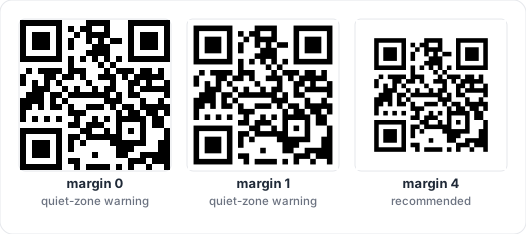
The empty space around the code. Scanners need it to find the code: keep it at 2 or more, 4 is the standard.
{ "margin": 2 }Modules
The small squares that carry the data.
| Key | Type | Default | Range | Used by |
|---|---|---|---|---|
modules.shape |
string | "square" |
see below | all |
modules.size |
number | 1 |
0.1 to 1 | square, dot, rounded, diamond, star, hbars, vbars |
modules.roundness |
number | 1 |
0 to 1 | rounded, fluid, liquid, bevel, classy, hbars, vbars |
modules.color |
paint | "#000000" |
all |
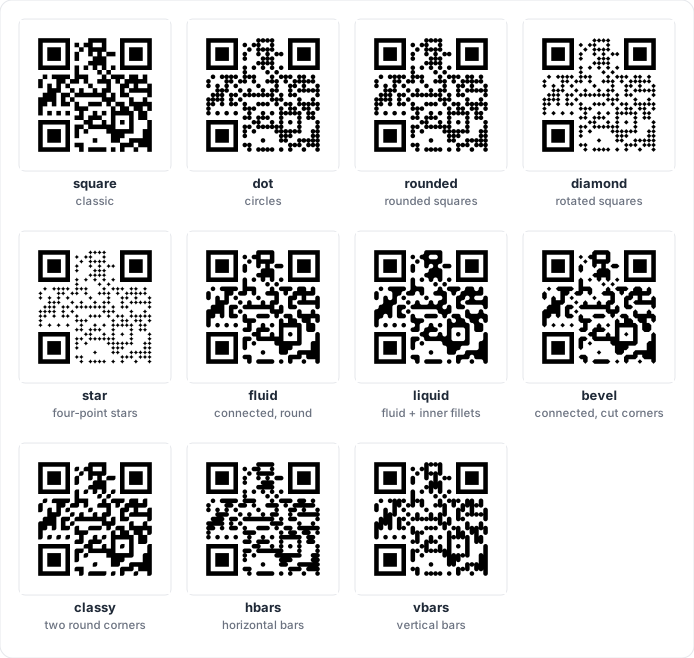
| Shape | Description |
|---|---|
square |
Classic squares. Neighbours merge into solid areas. |
dot |
Circles. |
rounded |
Squares with rounded corners, each on its own. |
diamond |
Squares turned 45 degrees. |
star |
Four-point stars. |
fluid |
Neighbours connect; outside corners are rounded. |
liquid |
Like fluid, and inside corners get a smooth fillet. |
bevel |
Neighbours connect; outside corners are cut at 45 degrees. |
classy |
Neighbours connect; only the top-left and bottom-right corners are rounded. |
hbars |
Horizontal runs of modules become pills. |
vbars |
Vertical runs of modules become pills. |
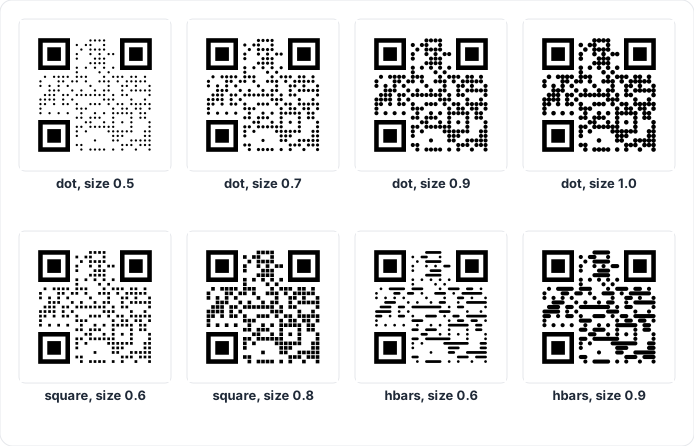
Size shrinks each module inside its cell and leaves a gap. For the bar
shapes it is the thickness of the bar. Below 0.6, codes get harder to read
(lint reports small-modules).
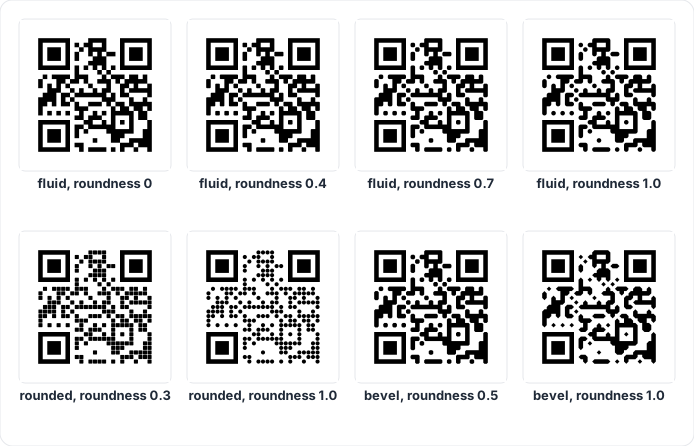
Roundness controls how round the corners are: 0 gives sharp corners, 1
the roundest shape. For bevel it is the size of the cut.
{ "modules": { "shape": "liquid", "roundness": 0.8, "color": "#1d3557" } }Eyes
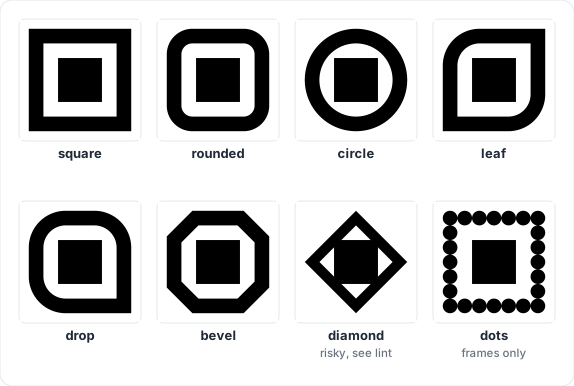
The three finder patterns in the corners. Each eye has a frame (the
outer ring) and a ball (the center square). Shapes that are not
symmetric, such as leaf and drop, turn so that their sharp corner points
towards the center of the code.
| Key | Type | Default | Values |
|---|---|---|---|
eyes.frame |
string | "square" |
square, rounded, circle, leaf, drop, bevel, diamond, dots |
eyes.ball |
string | "square" |
the same list |
eyes.frameColor |
paint or null |
null (same as modules) |
|
eyes.ballColor |
paint or null |
null (same as modules) |
Frames:
Balls:
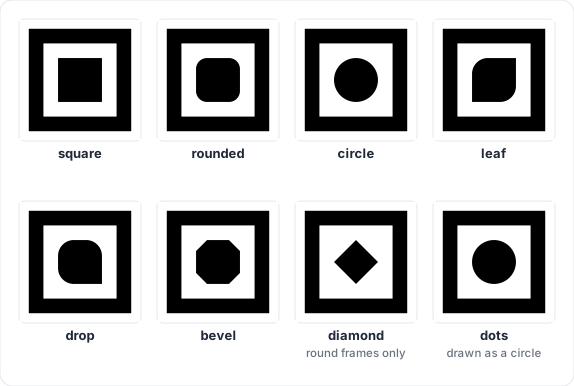
Two combinations confuse scanners, and lint reports them as eye-shapes:
a diamond frame (with any ball), and a diamond ball inside a square or
leaf frame. A dots ball is drawn as a circle, because a grid of dots
would break the eye’s proportions.
Eyes can have their own colors, including gradients:
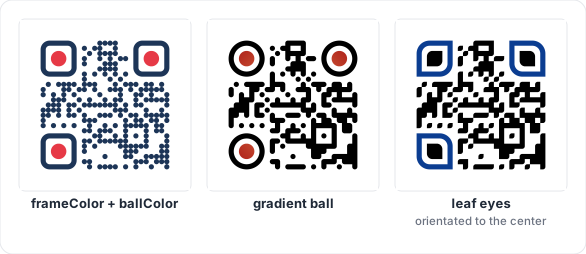
{
  "eyes": {
    "frame": "rounded",
    "ball": "circle",
    "frameColor": "#1d3557",
    "ballColor": "#e63946"
  }
}
Alignment patterns
Codes of version 2 and larger have small square targets that help scanners read codes photographed at an angle. By default they are drawn like any other module. You can draw them as small eyes instead.
| Key | Type | Default | Values |
|---|---|---|---|
alignment.frame |
string or null |
null (draw as modules) |
eye shapes |
alignment.ball |
string or null |
null (square when a frame is set) |
eye shapes |
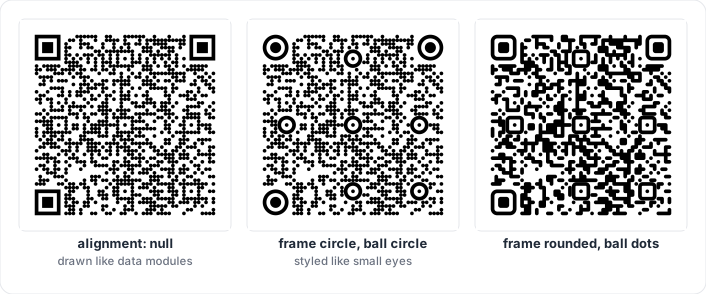
They use the eye colors (eyes.frameColor, eyes.ballColor).
{ "alignment": { "frame": "circle", "ball": "circle" } }Colors and gradients
Every color option accepts a paint: a color string, a gradient object,
or null for “nothing”.
Color strings: "#rgb", "#rrggbb", "#rrggbbaa" (the last two digits
are opacity, 00 transparent to ff opaque) or "transparent".
Gradients:
{ "type": "linear", "angle": 45,
  "stops": [ { "offset": 0, "color": "#6a11cb" }, { "offset": 1, "color": "#2575fc" } ] }

{ "type": "radial", "cx": 0.5, "cy": 0.5, "r": 0.75,
"stops": [ { "offset": 0, "color": "#0b3d91" }, { "offset": 1, "color": "#00a896" } ] }| Key | Type | Default | Meaning |
|---|---|---|---|
type |
"linear" or "radial" |
"linear" |
|
angle |
number (degrees) | 0 |
Linear only. 0 goes left to right, 90 top to bottom. |
cx, cy |
number | 0.5 |
Radial only. Center, as a fraction of the code (0.5 = middle). |
r |
number | 0.75 |
Radial only. Radius, as a fraction of the code width. |
stops |
list | Up to 8 colors, each with an offset from 0 to 1. |
A gradient covers the area of the code (the background gradient covers the whole image), so the modules and the eyes share one smooth gradient.
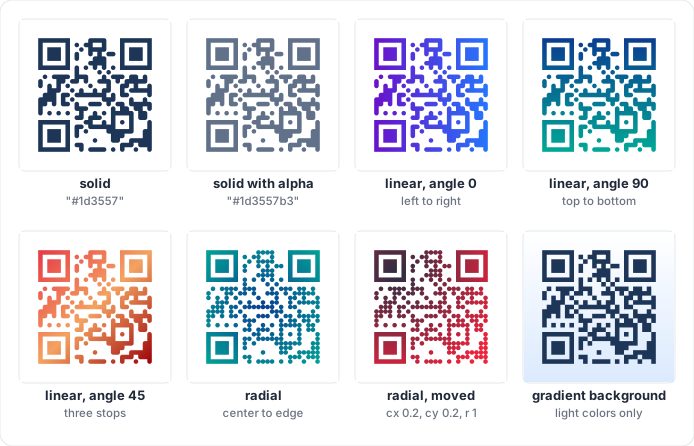
Keep every color of a module gradient dark enough to contrast with the
background: lint checks all of them. See
Colors and contrast.
Background and border
| Key | Type | Default | Range |
|---|---|---|---|
background.color |
paint or null |
"#ffffff" |
null = transparent |
background.radius |
number | 0 |
0 to half the image size, in modules |
border.width |
number | 0 |
0 to 1000 modules |
border.color |
color string | "#000000" |
The border is drawn outside the quiet zone, so it never eats into the margin the scanner needs.
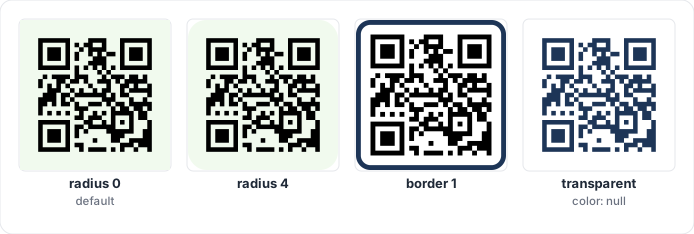
{
  "margin": 2,
  "background": { "color": "#fff8e7", "radius": 3 },
  "border": { "width": 1, "color": "#1d3557" }
}
Logo
| Key | Type | Default | Range |
|---|---|---|---|
logo |
object or null |
null (no logo) |
|
logo.href |
string | none | Image URL or data: URI (used by SVG output) |
logo.size |
number | 0.2 |
0 to 1, fraction of the code width |
logo.margin |
number | 1 |
0 to 1000 modules of clear space around the logo |
logo.shape |
string | "square" |
square, rounded, circle: shape of the cleared area |
logo.excavate |
boolean | true |
Remove the modules under the logo area |
logo.background |
color string or null |
null |
Fill of the cleared area |
The image keeps its proportions and is centered in a square box. In the SVG
output the image is referenced by href; raster outputs take the image as a
separate argument (see your package’s README).
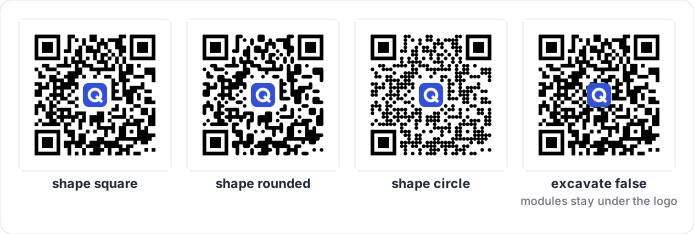
When a logo is present and you do not set encode.ecc, QRKude uses error
correction H. Check the logo damage before you publish a design: see
Logos in the guide.
{
  "logo": {
    "href": "data:image/png;base64,iVBORw0KGgo...",
    "size": 0.22,
    "shape": "circle",
    "background": "#ffffff"
  }
}
Label
A line of text below or above the code, inside the border.
| Key | Type | Default | Range |
|---|---|---|---|
label |
object or null |
null (no label) |
|
label.text |
string | none | An empty text means no label |
label.font |
string | "sans-serif" |
Any CSS font family list |
label.size |
number | 4 |
0.1 to 1000 modules (font size) |
label.color |
color string | "#000000" |
|
label.position |
string | "bottom" |
bottom, top |
label.bold |
boolean | true |
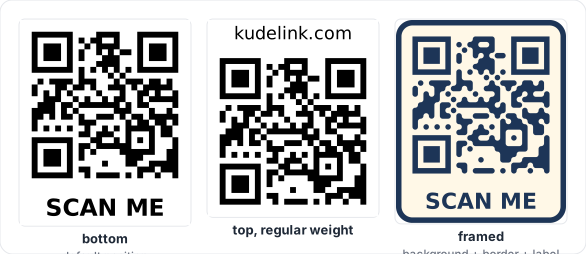
Labels need a font engine. SVG, the web canvas, Qt, Flutter and Python’s PNG output draw them; the microcontroller rasterizers (C core, Arduino, LVGL) leave the label area empty.
{ "label": { "text": "SCAN ME", "color": "#1d3557", "position": "bottom" } }Encoding options
These go in the encode part of the document.
| Key | Type | Default | Meaning |
|---|---|---|---|
ecc |
"L", "M", "Q", "H" |
"M", or "H" with a logo |
Minimum error correction level |
minVersion |
integer | 1 |
Smallest code size to use (1 to 40) |
maxVersion |
integer | 40 |
Largest code size to use (1 to 40) |
mask |
integer | -1 (automatic) |
Force one of the eight masks (0 to 7) |
boostEcc |
boolean | true |
Raise the ECC level when it does not make the code bigger |
eci |
boolean | false |
Mark the text as UTF-8 for old scanners |
See Versions and capacity and Error correction in the guide.
SVG options
These go in the svg part of the document.
| Key | Type | Default | Meaning |
|---|---|---|---|
width |
number | 0 |
Width in pixels written to the SVG. 0 leaves the size to the page. |
idPrefix |
string | "qrk" |
Prefix for gradient ids. |
Gradient ids are shared by a whole HTML page. When you put several QRKude
SVGs with gradients on one page, give each one its own idPrefix. Only
letters, digits, - and _ are kept; other characters become _.
Complete example
{
  "encode": { "ecc": "H" },
  "style": {
    "margin": 3,
    "modules": {
      "shape": "liquid",
      "roundness": 0.9,
      "color": {
        "type": "linear", "angle": 135,
        "stops": [
          { "offset": 0, "color": "#0b3d91" },
          { "offset": 1, "color": "#00796b" }
        ]
      }
    },
    "eyes": { "frame": "leaf", "ball": "drop", "frameColor": "#0b3d91", "ballColor": "#e63946" },
    "alignment": { "frame": "circle", "ball": "circle" },
    "background": { "color": "#fdfcdc", "radius": 4 },
    "border": { "width": 1.5, "color": "#0b3d91" },
    "logo": { "href": "https://example.com/logo.png", "size": 0.18, "margin": 0.5,
              "shape": "rounded", "background": "#fdfcdc" },
    "label": { "text": "kudelink.com", "color": "#0b3d91" }
  },
  "svg": { "width": 512, "idPrefix": "promo" }
}
With the text https://kudelink.com/qr this gives a version 3 code with ECC
H, a logo damage of 0.55 and no lint warnings. Paste it into the web
playground (packages/web/demo) to see it, or pass it to any package’s
“style from JSON” function.
This page is docs/STYLES.md in the QRKude repository.